Skai Agent Connect enables marketers and developers to connect their own AI agents to Skai’s omnichannel marketing infrastructure through MCP. Launching with 34 tools across Reporting and Campaign Actions, Agent Connect gives external AI agents access to cross-publisher data and supported campaign operations with human review and approval. Ofir Ben Dor, Chief Engineering Officer at Skai, explains the engineering behind Agent Connect and what these new capabilities mean for marketers.
As marketers look to use AI agents for more of their day-to-day work, execution across publishers adds another layer of complexity. Agents need access to the right data, tools, accounts, and workflows before they can take meaningful action.
To expand what agents can do, Skai brought together 15 engineers across seven groups as part of the engineering effort behind Agent Connect. The result is 34 tools available at launch across Reporting and Campaign Actions, including capabilities that allow external AI agents to retrieve performance data and prepare supported campaign operations across different channels.
We had two main goals:
- Expand the Skai capabilities available to external AI agents through MCP.
- As an engineering org, build the standards and foundation for MCP so that, moving forward, any new feature is AI-ready for agents by default.
How does Skai’s MCP connect AI agents to marketing execution?
For marketers managing campaigns across multiple publishers and accounts, getting an AI agent to complete a task can quickly become complicated. It’s even more complicated at scale, with thousands of campaigns and millions of keywords and ads running across multiple publishers. The agent needs access to the right data, tools, accounts, and publisher-specific workflows before it can take action.
Agent Connect gives AI agents running in marketers’ own technology stacks a standardized way to access Skai’s cross-publisher data and capabilities. Because marketers already use Skai to manage activity across publishers and accounts, an agent can work through that existing connection rather than requiring marketers to piece together separate publisher-level workflows.
Agent Connect launches with two types of connectors: Reporting and Campaign Actions. Reporting Connectors provide access to unified spend, pacing, and performance data, while Campaign Actions Connectors allow agents to prepare supported campaign operations for human review and approval. Insights and Optimization Connectors will follow, expanding the intelligence and optimization capabilities available to external agents.
We’ve covered the architecture and thinking behind this approach in more detail in our article on how write-access MCP closes the distance between spotting a problem and fixing it.
Agent Connect builds on that foundation by expanding the range of marketing tasks external agents can perform through Skai.
What did we add to Skai’s MCPs?
At launch, Agent Connect offers 34 tools across Reporting and Campaign Actions. The Campaign Actions capabilities give AI agents more ways to support campaign execution across the publishers and workflows marketers already manage through Skai.
These capabilities span 100+ publishers including:
- Amazon
- Walmart
- Instacart
- Microsoft Advertising
- Sam’s Club
- Criteo
Depending on the publisher, the expanded capabilities cover campaigns, ad groups, ads, keywords, negative keywords, targeting, sitelinks, and other campaign entities.
For marketers, the value is in the breadth of work now available to agents through Skai. More of the campaign operations already centralized within Skai can now become part of agent-driven workflows.
This builds on the MCP work already underway at Skai. In testing across 810 runs, Skai’s Reporting Connectors returned complete and accurate answers to 100% of questions posed, compared with 48% for an individual publisher MCP, with modeled token costs up to 90% lower.
What can AI agents do with these new capabilities?
The clearest way to understand the expansion is to look at what agents can actually do with it. We tested the new Campaign Actions capabilities through live demos built around marketing workflows. Teams demonstrated agents working across several publishers and entity types, including:
- Creating and updating Walmart keywords
- Creating Google campaigns
- Creating Amazon entities
- Creating and updating Walmart ad groups
- Creating Instacart campaigns
- Working with Google negative keywords
The work also extends beyond campaign actions. Upcoming Insights Connectors will expose more of Skai’s decision-ready intelligence to external agents, including forecasting, pacing, keyword discovery, experiment analysis, and AMC reporting. Optimization Connectors will enable agents to apply Skai’s AI and machine-learning capabilities across bids, budgets, and other optimization workflows.


Together, these connectors are designed to support workflows that span understanding performance, identifying opportunities, and preparing and executing supported campaign operations.
How does an agent go from a request to an operation?
As agents take on more marketing tasks, marketers also need visibility into what an agent plans to do before changes reach a live campaign. For this effort, we standardized a six-stage workflow:
- User Request: The marketer asks the AI agent to perform an operation
- Tool Discovery: The agent reads MCP tool descriptions and identifies the best match
- Skill Loading: The tool points to the skill containing the instructions needed for that publisher and entity
- Preview: The workflow validates what will be created or updated and surfaces any errors
- User Approval: The marketer reviews and confirms the proposed changes
- Apply: The operation is executed after approval
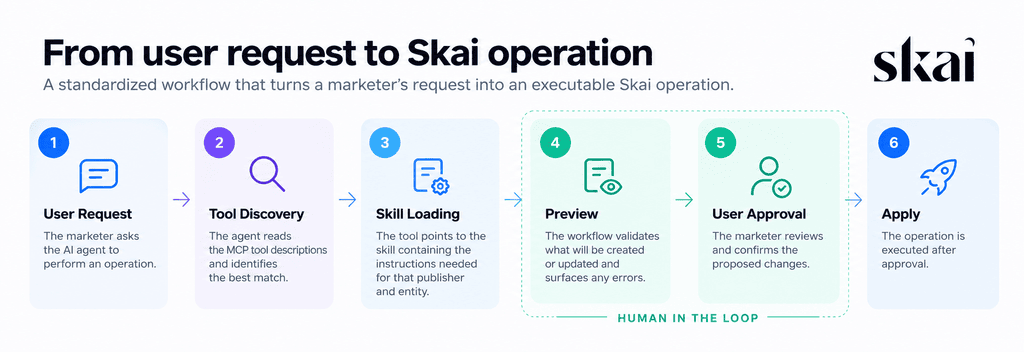
This workflow connects the user’s request to the appropriate Skai capability while preserving a clear checkpoint before execution. The agent identifies the appropriate capability, prepares and validates the operation, and presents the proposed change for user approval before it is applied. Every proposed change remains subject to human review and approval, with a clear audit trail.
Why do agents need both tools and skills?
Giving an agent access to a capability does not automatically give it the operational knowledge required to use that capability correctly. That is the role of skills.
A tool tells the agent what capability is available, while a skill provides the instructions needed to turn that capability into a completed task. For example, during the skill-loading stage, a tool can point the agent to instructions explaining the required CSV formatting for a particular publisher and entity.
This distinction becomes especially important when working across publishers. The underlying capability can be exposed through MCP, while the skill provides the specific instructions the agent needs for the publisher or entity involved, creating a structure that can be reused as support expands.
How did we make it easier to expand Skai’s MCP?
The 34 tools available at launch were only part of the Agent Connect engineering effort. We also wanted to make it easier for engineering teams across Skai to contribute the next capability to ensure from now on, any new capabilities is agent ready from day one.
To create that foundation, the teams built:
- Scaffolding for new entities: A skill for adding a new entity to Campaign Actions
- Local testing: An environment for testing new capabilities against the lab
- Reusable Campaign Actions skills: Shared skills for common areas across publishers and entities
- Centralized documentation: A well-organized wiki for teams working with MCP
- Permissions: Work to resolve permission issues and make it easier for teams to contribute
Much of this work happens behind the scenes, but it has a direct impact on customers. Shared infrastructure gives Skai teams a common starting point for developing and testing additional MCP capabilities, creating a more repeatable path for expanding what agents can do through the platform.
What does this expansion mean for marketers?
Agent Connect gives marketers a larger set of Skai capabilities they can put in the hands of their own AI agents. For those already using Skai’s MCP, more supported workflows can move through the same connection and execution process. For those evaluating MCP, Agent Connect demonstrates how external AI agents can connect to cross-publisher marketing operations through Skai without requiring marketers to recreate the underlying infrastructure themselves.
The 34 tools available at launch also create a foundation for continued development. As Skai teams add capabilities, additional operations can follow the same process for tool discovery, skill loading, preview, approval, and execution.
Ultimately, marketers can put agents to work across more real campaign tasks while retaining visibility and control over execution.
Ready to put Skai’s MCP to the test?
See how an AI agent can use Skai to analyze performance, identify wasted budget, and prepare campaign changes for your approval in an interactive simulation. Check out Skai Agent Connect today.
Frequently Asked Questions
Agent Connect gives marketers a way to connect their own AI agents to Skai’s marketing infrastructure through MCP. At launch, Reporting and Campaign Actions Connectors offer 34 tools that extend the range of reporting and campaign operations agents can support while maintaining human review and approval before supported changes are executed.
The work includes capabilities across Amazon, Google, Walmart, Instacart, Microsoft Advertising, Sam’s Club, and Criteo. Available operations vary by publisher and include campaigns, ad groups, ads, keywords, negative keywords, targeting, sitelinks, and other entities.
The standardized workflow includes preview and user approval before an operation is applied. The agent identifies the appropriate tool and skill, prepares and validates the proposed change, and presents it to the user. The operation is executed after the user approves it with a clear audit trail.
More like this
-

The Road to Agentic Marketing: Skai at Amazon Ads unBoxed 2021-2025
-
Who’s Accountable When AI Agents Buy Media?
-
From Insights to Action: A Practical Framework for Governed AI Agent Execution
-
Skai Reporting Connector vs. Publisher MCPs: Test Results Reveal Up to 90% in Cost Savings
-
Data Ownership in the Age of Agentic AI: What To Ask Before Signing
-
Ask the Experts: What Makes Agentic AI Work for Agencies?