Amazon Prime Day 2026 preparation is shifting from static reporting to live, AI-driven optimization. Learn how Skai’s Celeste uses real-time commerce media data inside the platform to help marketers audit campaigns, forecast performance, optimize budgets, improve keyword strategy, protect share of voice, and automate Prime Day workflows. The ten Celeste AI prompts outlined here help retail media teams turn Prime Day planning into faster, data-connected decision-making that improves efficiency before, during, and after the event.
You can paste a Prime Day report into ChatGPT right now and get back something that sounds pretty smart. Same with Claude, Gemini, Copilot, or any other answer engine. Every public AI tool will happily summarize your data, surface trends, and even suggest optimizations. But every one of them does it from a static export, stripped of context, and sitting on a server you don’t control.
That’s a problem on Prime Day.
When CPCs spike at 6 AM and budgets evaporate by noon, the analysis you need isn’t sitting in last week’s PDF. It’s in your live performance data, tied to the specific campaigns, keywords, and products you’re managing right now. Skai’s Celeste alone is built to work directly from that live performance data inside the Skai platform, across campaigns, publishers, and signals already connected.. No exports. No copy-paste. No sending sensitive commerce data into a tool your security team never approved.
That changes what AI can actually do for you. The same prompt that takes a public chatbot 30 minutes of file uploads and clarifying questions to half-answer, Celeste answers in seconds because your data is already there. Insights move straight into Skai workflows. The audit trail stays inside the platform. Your decisions stay grounded in what’s happening right now, not in a screenshot from last Tuesday.
Below are ten Celeste prompts to put to work over the next few weeks of Prime Day prep. Some help you plan. Some help you audit. Some help you stage the work that usually gets dropped after the event ends. Pick the ones that match where your time is bleeding most this week.
Your dimensions are messier than you think
The accounts that win Prime Day are the ones whose Dimensions and Categories are clean enough to act on quickly. The accounts that struggle are usually the ones whose tagging hasn’t been touched since last summer. Before you spend on a single Prime Day deal, run a coverage audit so your pivots during the event run on accurate segments instead of best guesses.
What you want is a coverage map. Which dimensions are populated, which campaigns are missing tags, and where the gaps are big enough to actually matter.
Try this prompt in Celeste. Analyze the campaigns in @[Profile]. Create a table that lists every Dimension and Category used in these profiles and rank them from most to least coverage. Flag any dimensions with less than 80% coverage as a priority to fix before Prime Day [event dates], and recommend which gaps will most affect my ability to optimize during the event.
A multi-day spreadsheet exercise becomes a coverage map you can act on the same morning. From there, agentic categorization can fill in branded versus competitor versus category keywords in bulk.

Stop building Prime Day plans from scratch every year
The first wasted week of Prime Day prep is usually spent figuring out what to optimize and when. Pull that work forward with a plan grounded in your actual account data, not a generic best-practices guide. The strategic decisions still stay with you. The starting point just doesn’t.
The right output is a working document that the team refines together, not a static checklist that ages out the second the first competitor moves.
Try this prompt in Celeste. Using my last 30 days of data, build a day-by-day optimization checklist for the 4 weeks ahead of Prime Day on [event dates] for @[Profile]. For each day, call out specific campaigns and publishers to act on, recommend bid and budget changes with percentage adjustments based on my actual ROI and CPC, flag underperformers to pause (ROI under 1x), and compare to the same period last year. Focus on my top 3 publishers by spend.
What used to be a planning meeting becomes a living document. The plan adapts as new data comes in, which is the only way day-by-day plans actually survive contact with Prime Day.
Last year’s data is the only forecast that matters
You can’t plan a 2026 Prime Day without an honest read of 2025: what worked, what didn’t, which categories overperformed, and where you bled budget. Celeste pulls the whole picture and turns it into a benchmark to plan against, not a recap that goes in a slide nobody reads.
This is the prompt that resets expectations before anyone starts pitching wishful spend increases.
Try this prompt in Celeste. Compare Prime Day 2025 performance against the 7 days before and after the event across @[Profile]. Break down results by publisher, campaign type, and top 10 product categories. Highlight what scaled efficiently, what overspent without converting, and any patterns I should plan around for Prime Day 2026 [event dates].
Use the output to set 2026 budget guardrails and category priorities. Save the rest for the post-event comparison in prompt 10.
Find your CPC sinkholes before Amazon does
Most teams discover their keyword problems on Day 1 of Prime Day, when CPCs jump and the wrong terms start burning budget. The agentic move is to find those weak spots before the event amplifies them. A senior practitioner doing this audit manually spends close to a week on it.
Try this prompt in Celeste. Run a Keyword and Search Term Health Check across @[Profile] for the last 60 days. Identify terms with high spend but low conversion (ROI under 1x), search terms triggering on irrelevant queries, gaps in my negative keyword coverage, and any branded vs non-branded balance issues. Rank fixes by potential savings.
Run this two weeks out and you’ll have time to add negatives, restructure ad groups, and rebid before the auction heats up. Try to do the same audit on Day 1 and you’re already paying for the mistakes.
Reallocate before you scale, not after
Adding budget to underperforming campaigns just stretches the inefficiency. Before scaling spend for Prime Day, find where the existing budget could already be working harder. The campaigns that prove they can absorb spend are where headroom should go first.
Try this prompt in Celeste. Review the last 30 days of spend across all retail media campaigns in @[Profile]. Identify campaigns with 4x+ ROI and above-average CVR that are budget-constrained, and campaigns running below 1.5x ROI with consistent spend. Recommend a reallocation plan ahead of Prime Day [event dates] that protects efficiency while building headroom in proven winners. Include expected revenue impact and urgency for each recommendation.

The output is a prioritized list of shifts you can act on the same day. That’s the version of budget planning that actually changes outcomes, not the quarterly recommendation that arrives after the moment has passed.
Your shelf is already being attacked
Prime Day amplifies competitive pressure on the same set of category and non-branded keywords every brand wants to own. If a competitor’s been gaining ground over the last 60 days, that pressure only gets worse the week of the event. Surface those shifts now, while there’s still time to defend.
Try this prompt in Celeste. Analyze Share of Voice for my top non-branded keywords in @[Profile] over the last 60 days. Compare my visibility against my top 3 competitors and flag categories where I’ve lost share. Recommend which keywords I should defend with budget increases or bid adjustments ahead of Prime Day [event dates], and where I’m wasting visibility on terms that don’t convert.
You’ll come out with a defense list and a deprioritization list. Both are worth more than they sound, especially in the categories where two or three competitors are clustered tight.
Stop sending traffic to broken product pages
A campaign optimized for ROAS still underperforms when the product is rated 3 stars, inventory is thin, or content is weak. Celeste connects media signals to retail conditions and flags where the problem is downstream of the ad, which saves you from amplifying a broken shelf at peak traffic.
Try this prompt in Celeste. Identify the top 25 SKUs by ad spend in @[Profile] over the last 30 days. For each, surface ROAS, conversion rate, and any signals tied to inventory levels or product ratings. Flag SKUs that are spending heavily but show weak conversion readiness, and recommend whether to upweight, hold, or pull back spend for Prime Day on [event dates].
The output forces a useful conversation with the brand or merchandising team well before the event, when fixes are still possible. The week of Prime Day is the worst possible time to discover a hero SKU has been sitting at three stars for a month.
Build the rules that fire when you can’t
The hardest hours of Prime Day are usually 6 to 10am, when the first wave hits, and the last few hours of Day 1, when budgets start running thin. Most teams handle these manually. Most teams also lose money doing it. Celeste can take your KPI goals and recent daily performance patterns and turn them into the rule structures you’ll want built in Skai before the event begins.
Try this prompt in Celeste. Using the last 60 days of daily performance data in @[Profile], identify the days where ROI exceeded my account average by 20%+ and the days where it fell below 1x. Compare against my daily performance during Prime Day 2025. Recommend the KPI thresholds and rule structures I should build in Skai’s Automated Actions, AI Dayparting, and Pacing Monitor for Prime Day 2026, including how aggressive my pacing safeguards should be based on past volatility.
You get a rule blueprint you can hand to your automation tools. Execution stays inside the guardrails your team has already set, and the calls that actually need a human still get a human.
Prime Day’s most durable win has nothing to do with ROAS
Prime Day disproportionately drives new-to-brand orders on Amazon. Those customers are the ones who repurchase through Q4, which makes NTB rate one of the more durable wins of the event. A plan that optimizes purely on same-week ROAS leaves a lot of that on the table.
Try this prompt in Celeste. Analyze my Amazon campaigns in @[Profile] over the last 90 days. What percentage of orders were New-to-Brand, and which campaigns and product categories drove the highest NTB rate? Recommend how I should structure my Prime Day plan, including campaign mix, audience targeting, and bid posture, to maximize new-to-brand acquisition during the event.
Use the output to set NTB targets alongside ROAS targets. Both belong on the same scorecard, and the brands that treat them as one number are the ones still benefiting from the event in November.
Build the post-event report before the event ends
Most teams underestimate how much of the year’s learning gets lost in the two-week gap between Prime Day ending and anyone having time to analyze what happened. By the time someone gets to it, attention has moved to back-to-school and the insights quietly evaporate. Pre-stage the report now so the post-event discussion shifts from what happened to what we do with it.
Try this prompt in Celeste. Set up a Prime Day post-event reporting outline for @[Profile]. Include week-over-week sales comparison, percentage of sales from new-to-brand orders, top 5 campaigns and SKUs by revenue, biggest YoY shifts vs Prime Day 2025 [event dates], and 3 to 5 recommended next-step actions for the back-half of the holiday season. Format as an executive summary I can share with leadership the morning after Day 2 ends.
By the time the event closes, your reporting is half-built. That’s the version of post-event analysis that compounds across events instead of evaporating.
Conclusion: Think AI-first to get ready for this Prime Day
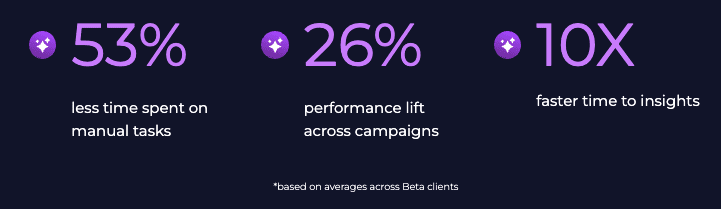
Ten prompts, one underlying point. Public AI tools analyze whatever you paste into them, but they’re working from static exports, stripped of context, on servers your security team didn’t approve. Celeste reads your live commerce data inside the platform, where you’ll actually act on the answer. That difference shows up every week of the year, especially during Prime Day.
Next steps? Pick the two or three prompts above that match a problem already on your desk this week. Run them, refine, and move to the next. The brands that win Prime Day 2026 are the ones who treat the prep window as a chance to see what agentic AI actually looks like in their own accounts, not as another scramble against the clock.
Skai is the AI-driven commerce media platform for performance advertising. For nearly two decades, the world’s top brands and agencies have trusted our award-winning technology to bring retail media, paid search, and paid social together into a single, strategic commerce media program. With embedded AI, connected data, and automation throughout, Skai helps marketers move faster, make smarter decisions, and drive more meaningful growth.
Ready to see what an agentic Prime Day looks like in your accounts? Schedule a quick demo.
Frequently Asked Questions
The best Amazon Prime Day 2026 AI prompts focus on budget optimization, keyword audits, share-of-voice analysis, and automation setup. Using live commerce data helps teams make faster decisions and adapt campaigns in real time before CPCs spike during the event.
Celeste improves Prime Day optimization by analyzing live retail media performance data directly inside the Skai platform. This allows marketers to uncover budget inefficiencies, identify weak-performing keywords, monitor inventory signals, and automate campaign actions without relying on static exports.
Live commerce data helps marketers react quickly to changing CPCs, budget pacing, and conversion trends during Prime Day. Static reports often lag behind real performance, while connected AI workflows provide current insights that support faster optimization decisions.
More like this
-

From AI Assistance to Agentic Execution: Skai’s Take on Amazon Ads unBoxed 2026
-
Ready for AI Agents to Do More? Inside Skai’s 34-Tool Agent Connect Launch
-
The Road to Agentic Marketing: Skai at Amazon Ads unBoxed 2021-2025
-
Who’s Accountable When AI Agents Buy Media?
-
From Insights to Action: A Practical Framework for Governed AI Agent Execution
-
Skai Reporting Connector vs. Publisher MCPs: Test Results Reveal Up to 90% in Cost Savings